Post- Production- Software
The Post-Productoin of our sequence consisted of editing, correcting and uploading our final film, this part of the production is what finalized our film in order to create a full prduct.


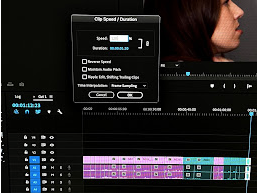
For the entire Post-production process, we used a software called Premiere Pro, by Adobe. This was what we used to edit together all of the footage we shot during our shooting day.
-
Using Premiere Pro, we first looked through all of our rushes and were able to categorize and organize them into files using this software. This made it much easier for us to then cut the shots down to size, color-coordinate them, and put them on the timeline in the correct order. We color-coordinated them by subject, for instance, the entrances, dialogue, and fight sequence all had different colors, this meant that we could place them on the timeline in the correct orders, having the wide shot and the close-up of the same thing in the same place, this made it more efficient when we were getting a certain punch or shove in the fight sequence.
-
We were also able to speed up and slow down shots in order to fit our intentions, if we wanted the shot to feel more rushed and tense, like the fight sequence, we sped the shots up, and if we wanted to prolong a shot to add tension, we slowed it down. This created anticipation and intensity in our film which is conventional if our genre.
-
Using Premiere Pro, we wrote, edited, and placed all of our titles within the sequence. This was especially useful in our final frame when we were able to time the visual door, the audio effect, and the title “Going Down” together at the same time, and made it an even more impactful ending to the scene.
-
We were also able to edit and correct the audio and add an effect to our desired soundtrack, so the quality was similar to inside an elevator. Using this audio effect, we were able to upload a song and place it within our film seamlessly.
-
We also used Adobe Photoshop to add a video screen effect onto the black and white security camera shot. This made the outside edges of the screen look like they were within a security camera and our lead’s actions had been recorded, which was a turning point within the scene that grabs our audience's attention.


Post-Production - Hardware and Online
Hardware

We used a Mac Pro 6 in order to edit our Opening sequence, and we were able to access both the software we needed, Premiere Pro. But we were also able to save our project on the desktop of the computer, so we could come back and continue over a period of multiple days. We were also able to photoshop our frame and add effects using this laptop and its Photoshop software.
Online


In order to find our soundtrack, we searched on Youtube for royalty-free elevator music, and we were able to choose from a wide variety of choices; since there was such an abundance of tracks to choose from, we were able to take our time and find one we thought really suited our sequence. We used a contrapuntal diegetic soundtrack, which we found on Youtube.
Throughout the entirety of the production process, we used blogger to write about our research, learning, shooting, and editing. This website allowed us to build custom blogs detailing the entire months-long process and is a tool we used in post-production to write our reflections. It was also useful to have our notes of workshops and mood boards, etc, online because it meant we were able to look over them if we got stuck or needed a reminder about anything.
